
Introduction
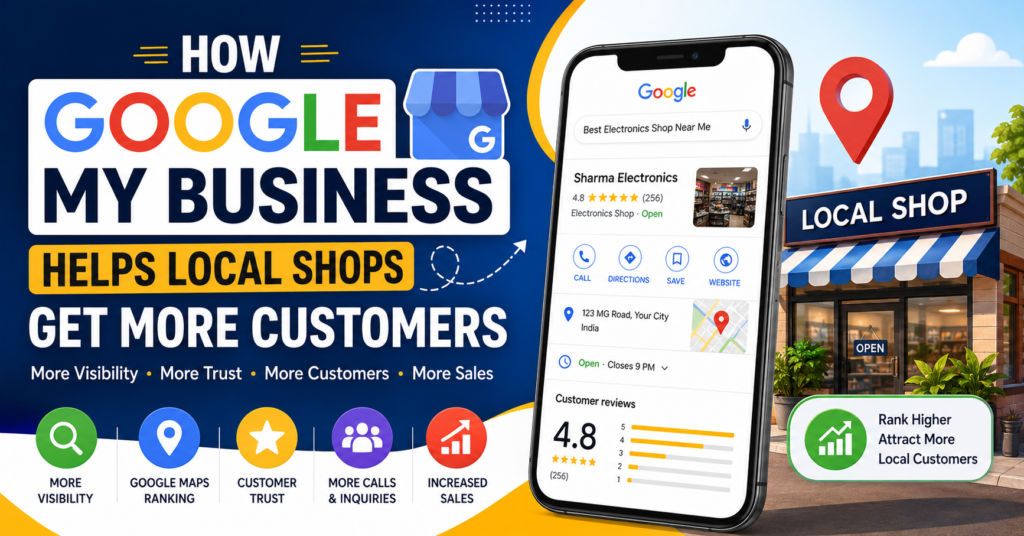
How Google My Business Helps Local Shops Get More Customers is one of the most important topics for small business owners in 2026. Today, customers search online before visiting a shop, booking a service, or buying a product. Whether someone is searching for a nearby grocery store, salon, restaurant, or electronics shop, their first step usually starts with Google Search or Google Maps.
In the modern digital world, having a physical store alone is no longer enough. If your business is not visible online, many potential customers may never discover your shop. This is where Google My Business — now called Google Business Profile — becomes extremely powerful.
Google Business Profile helps local shops:
- Appear on Google Maps
- Rank in local search results
- Increase customer trust
- Generate phone calls and inquiries
- Bring more walk-in customers
- Improve local SEO visibility
For small businesses with limited marketing budgets, Google My Business acts like a free online marketing tool that works 24/7.
Imagine a customer searching:
- “best bakery near me”
- “mobile shop nearby”
- “salon in Mumbai”
- “restaurant open now”
Google instantly shows nearby businesses with ratings, reviews, directions, contact details, and photos. Businesses with optimized Google profiles often receive the most attention and customer visits.
In 2026, local SEO and online visibility are becoming even more important because:
- Mobile searches are increasing
- Voice searches are growing
- AI-powered search recommendations are improving
- Customers rely heavily on reviews before buying
If your local shop is not optimized on Google, your competitors may attract customers that could have visited your business instead.
In this complete guide, you will learn:
- What Google My Business is
- How it works
- Why it matters for local businesses
- How Google My Business helps local shops get more customers
- How to optimize your profile
- Common mistakes to avoid
- Future trends in local search marketing
Let’s begin by understanding what Google My Business actually is.
What is Google My Business?
Google My Business, officially known as Google Business Profile, is a free tool from Google that allows businesses to manage their online presence across Google Search and Google Maps.
It helps local businesses display important information such as:
- Business name
- Address
- Phone number
- Website
- Photos
- Reviews
- Business hours
- Directions
- Products and services
When customers search for local businesses, Google often displays Business Profiles directly in search results.
For example:
If someone searches:
- “coffee shop near me”
- “digital marketer in Mumbai”
- “best gym nearby”
Google shows local business listings with:
- Ratings
- Reviews
- Contact details
- Photos
- Map locations
This makes it easier for customers to choose and contact businesses instantly.
Where Google Business Profiles Appear
1. Google Search Results
Your business can appear when users search for:
- Your business name
- Related services
- Nearby businesses
This increases online visibility significantly.
2. Google Maps
Google Maps is one of the biggest drivers of local customer traffic in 2026.
Customers use Maps to:
- Find nearby businesses
- Get directions
- Read reviews
- Compare ratings
Appearing on Google Maps can dramatically increase walk-in customers.
3. Local Pack Results
The “Local Pack” is the top section Google displays for local searches.
For example:
When someone searches “best salon near me,” Google often shows:
- 3 top businesses
- Ratings
- Maps
- Contact details
Businesses in the Local Pack receive high visibility and more clicks.
Why Google My Business is Important for Local Shops in 2026
Increased Online Visibility
One of the biggest benefits of Google Business Profile is improved online visibility.
Millions of local searches happen daily. Customers constantly search for nearby products and services using smartphones.
Without Google My Business, your shop may not appear when people search online.
An optimized profile helps your business:
- Appear in local searches
- Reach nearby customers
- Increase brand awareness
- Attract new visitors
For local businesses, visibility directly impacts revenue.
Better Local SEO Rankings
Local SEO is extremely important in 2026.
Google ranks businesses based on:
- Relevance
- Distance
- Prominence
- Reviews
- Profile optimization
Businesses with optimized Google profiles are more likely to rank higher in:
- Google Maps
- Local search results
- “Near me” searches
Higher rankings lead to more customer traffic.
Appearing on Google Maps
Google Maps has become one of the most powerful local marketing platforms.
Customers use Maps to:
- Find stores
- Compare ratings
- Get directions
- View photos
- Contact businesses
Many customers visit businesses directly from Maps results without even visiting the website.
For local shops, appearing on Maps can increase:
- Foot traffic
- Calls
- Store visits
- Brand visibility
More Walk-In Customers
Google My Business helps convert online searches into physical store visits.
For example:
A customer searching for:
“best mobile repair shop near me”
will likely choose a business that:
- Has strong reviews
- Shows photos
- Displays accurate hours
- Appears nearby
This directly increases walk-in customers.
Improved Trust and Credibility
Customers trust businesses with:
- Good ratings
- Positive reviews
- Professional photos
- Verified Google listings
Businesses without profiles often appear less trustworthy.
In 2026, trust is one of the biggest factors influencing buying decisions.
Google reviews especially play a huge role in customer confidence.
Better Customer Engagement
Google Business Profiles allow businesses to engage directly with customers through:
- Reviews
- Messaging
- Q&A sections
- Posts and updates
This interaction builds stronger customer relationships.
Customers appreciate businesses that actively respond online.
Free Marketing Tool for Small Businesses
One of the best things about Google My Business is that it is free.
Small businesses can market themselves online without spending large amounts on advertising.
Features include:
- Free business listing
- Free visibility
- Free customer interaction
- Free traffic opportunities
For startups and local shops, this is incredibly valuable.
Mobile Search Advantages
Most local searches now happen on smartphones.
Customers search while:
- Traveling
- Shopping
- Exploring nearby places
Google My Business is optimized for mobile users, making it easier for customers to:
- Call businesses
- Navigate locations
- Read reviews
- Visit stores
Mobile visibility is essential for local business growth.
Voice Search Visibility
Voice searches are growing rapidly in 2026.
People ask smart assistants:
- “Where is the nearest bakery?”
- “Best salon near me”
- “Coffee shop open now”
Google often pulls information from optimized Business Profiles.
Businesses with accurate profiles have better chances of appearing in voice search results.
AI-Powered Local Search Trends
AI is changing local search behavior.
Modern search engines now recommend businesses based on:
- Reviews
- Popularity
- Customer engagement
- Profile completeness
- Website quality
Businesses with active and optimized Google profiles are more likely to appear in AI-generated recommendations.
How Google My Business Helps Local Shops Get More Customers
Helps Customers Discover Nearby Shops
Many customers search for local businesses with high buying intent.
For example:
- “best pizza near me”
- “shoe store nearby”
- “grocery shop open now”
Google Business Profile helps your shop appear in these searches.
This increases discovery among local customers actively looking to buy.
Drives Calls and Customer Inquiries
Google profiles include direct call buttons.
Customers can instantly contact businesses with one tap.
This increases:
- Phone inquiries
- Appointment bookings
- Product inquiries
- Customer engagement
Quick communication improves conversion opportunities.
Increases Website Visits
Google Business Profiles can drive traffic to your website.
Customers often visit websites to:
- View services
- Check pricing
- Explore products
- Read blogs
- Make purchases
This creates a powerful combination of:
- Local SEO
- Website traffic
- Lead generation
Improves Foot Traffic
One of the biggest advantages of Google Maps visibility is increased physical store visits.
Customers can:
- Find directions instantly
- View operating hours
- Check nearby distance
This convenience encourages more in-store visits.
Displays Customer Reviews
Reviews strongly influence customer decisions.
Most people read reviews before choosing a business.
Positive reviews:
- Build trust
- Improve reputation
- Increase conversions
- Influence rankings
Businesses with strong ratings often attract significantly more customers.
Builds Social Proof
Social proof is extremely powerful.
When customers see:
- High ratings
- Positive reviews
- Active engagement
they feel more confident purchasing from your business.
This is especially important for new customers unfamiliar with your brand.
Displays Photos and Products
Photos attract attention and improve engagement.
Businesses should upload:
- Store images
- Product photos
- Team pictures
- Interior photos
Visual content increases customer interest and trust.
Businesses with quality images usually receive more clicks and visits.
Shares Updates and Offers
Google Business Profiles allow businesses to post:
- Offers
- Promotions
- Events
- Updates
- Announcements
Regular updates keep customers engaged and informed.
For example:
A restaurant can promote:
- Weekend discounts
- New menu launches
- Festive offers
This increases customer engagement and repeat visits.
Provides Directions Through Maps
Google Maps navigation helps customers find your shop easily.
Accurate directions reduce customer frustration and improve convenience.
This is especially important for:
- Restaurants
- Clinics
- Salons
- Retail stores
Easy accessibility improves customer experience.
Enables Direct Customer Interaction
Customers can interact with businesses through:
- Messages
- Reviews
- Questions
- Calls
This improves communication and customer satisfaction.
Businesses that respond quickly often build stronger relationships with customers.
Step-by-Step Guide to Create a Google My Business Profile
Step 1: Create a Google Account
To begin, create a Google account if you don’t already have one.
Use a professional business email whenever possible.
Step 2: Visit Google Business Profile
Go to the official Google Business Profile platform and click:
“Manage Now”
Then enter your business details.
Step 3: Add Your Business Name
Use your real business name.
Avoid:
- Keyword stuffing
- Unnecessary words
- Fake business names
Consistency is important for local SEO.
Step 4: Choose the Correct Business Category
Categories help Google understand your business.
For example:
- Restaurant
- Salon
- Electronics Store
- Marketing Agency
Selecting accurate categories improves rankings.
Step 5: Add Business Address
Enter your correct business address carefully.
This helps Google Maps show your location accurately.
Step 6: Add Contact Information
Include:
- Phone number
- Website URL
- Email address
Accurate contact details improve trust and customer communication.
Step 7: Upload High-Quality Photos
Photos significantly improve engagement.
Upload:
- Storefront photos
- Product images
- Team photos
- Interior images
Businesses with quality photos usually perform better.
Step 8: Verify Your Business
Google usually verifies businesses through:
- Postcards
- Phone
- Video verification
Verification confirms your business authenticity.
Step 9: Optimize Your Profile
After verification:
- Add descriptions
- Add services
- Add products
- Enable messaging
- Collect reviews
Optimization improves local SEO performance.
Google My Business Optimization Tips
Add High-Quality Photos
Professional photos attract more clicks and engagement.
Use:
- Bright images
- Clear branding
- Real business photos
Avoid blurry or low-quality pictures.
Use Local Keywords
Include local keywords naturally in:
- Descriptions
- Posts
- Services
Example:
“Best salon in Mumbai”
This improves local SEO visibility.
Collect Customer Reviews
Reviews improve:
- Rankings
- Trust
- Conversions
Encourage satisfied customers to leave feedback.
Reply to Reviews
Always respond professionally to:
- Positive reviews
- Negative reviews
This shows customer care and professionalism.
Keep Information Updated
Update:
- Business hours
- Contact details
- Photos
- Offers
Outdated information damages trust.
Google My Business Optimization Tips (Continued)
Post Regular Updates
Google Business Profile allows businesses to publish posts just like social media platforms.
You can share:
- Discounts
- Festival offers
- Product launches
- New arrivals
- Events
- Announcements
Regular posting signals activity to Google and helps improve customer engagement.
For example:
A clothing store can post:
- “Flat 30% Off on Summer Collection”
- “New Festive Arrivals Available Now”
These updates encourage customers to visit your shop.
Add Products and Services
Businesses should clearly list:
- Products
- Services
- Pricing
- Features
This helps customers quickly understand what your business offers.
For example:
A salon can add:
- Haircut
- Hair coloring
- Facial packages
- Bridal makeup
An electronics shop can add:
- Smartphones
- Accessories
- Repair services
Detailed listings improve visibility and conversions.
Enable Messaging
Google Business Profile allows customers to message businesses directly.
This feature helps:
- Increase inquiries
- Improve communication
- Build customer trust
Quick replies often improve customer satisfaction and increase conversions.
Add FAQs
Frequently Asked Questions help customers find quick answers.
You can answer common questions like:
- Do you offer home delivery?
- What are your business hours?
- Is parking available?
- Do you accept online payments?
FAQs improve customer experience and reduce confusion.
Track Insights and Analytics
Google Business Profile provides useful analytics called “Insights.”
Businesses can track:
- Search views
- Customer actions
- Website clicks
- Direction requests
- Phone calls
- Photo performance
These insights help businesses understand customer behavior and improve marketing strategies.
How Google Reviews Influence Customers
Reviews Build Trust
In 2026, online reviews are one of the biggest trust factors for local businesses.
Most customers check reviews before:
- Visiting a shop
- Booking services
- Buying products
Positive reviews make businesses appear:
- Reliable
- Professional
- Popular
- Trustworthy
Businesses with higher ratings usually attract more customers.
Reviews Influence Buying Decisions
Imagine two restaurants:
- One has a 4.8-star rating with 500 reviews
- Another has a 3.2-star rating with 12 reviews
Most customers will naturally choose the higher-rated business.
Reviews heavily influence:
- Customer confidence
- Purchase decisions
- Brand perception
Reviews Improve Local SEO Rankings
Google considers reviews when ranking local businesses.
Businesses with:
- More reviews
- Better ratings
- Active engagement
often rank higher in Google Maps and local search results.
This means reviews impact both trust and visibility.
How to Get More Customer Reviews
Businesses can encourage reviews by:
- Asking satisfied customers politely
- Sharing review links
- Using QR codes in stores
- Sending follow-up messages
- Offering excellent customer service
However, businesses should never:
- Buy fake reviews
- Post fake feedback
- Manipulate ratings
Authentic reviews are always best.
Handling Negative Reviews Professionally
Negative reviews happen to every business.
The key is responding professionally.
Good response practices:
- Stay calm
- Apologize politely
- Offer solutions
- Avoid arguments
- Show professionalism
Professional responses can actually improve customer trust.
Customers often judge businesses by how they handle complaints.
Common Mistakes Local Shops Should Avoid
Incomplete Profiles
Many businesses leave profiles unfinished.
Missing information reduces trust and visibility.
Always complete:
- Business descriptions
- Hours
- Contact details
- Services
- Photos
Complete profiles perform better.
Wrong Business Information
Incorrect information frustrates customers.
Examples:
- Wrong phone numbers
- Incorrect addresses
- Outdated hours
This can lead to:
- Lost customers
- Bad reviews
- Reduced trust
Always keep information accurate.
Ignoring Reviews
Ignoring reviews sends a negative message.
Businesses should respond regularly to:
- Positive reviews
- Questions
- Complaints
Active engagement improves credibility.
Low-Quality Images
Blurry or poor-quality photos create a bad impression.
Businesses should upload:
- Bright photos
- Clear product images
- Professional storefront pictures
High-quality visuals improve engagement significantly.
Inconsistent Contact Details
Your:
- Website
- Social media
- Google profile
should all display consistent information.
Inconsistent details confuse both customers and search engines.
No Updates or Posts
Inactive profiles appear outdated.
Regular updates improve:
- Customer engagement
- SEO performance
- Business activity signals
Posting weekly is a good strategy.
Keyword Stuffing
Some businesses overload descriptions with keywords.
Example:
“Best salon Mumbai best salon near me salon Mumbai cheap salon.”
This looks spammy and harms user experience.
Use keywords naturally.
Benefits for Different Types of Local Businesses
Restaurants
Restaurants benefit massively from Google Business Profile.
Customers can:
- View menus
- Read reviews
- See photos
- Get directions
- Reserve tables
Restaurants with strong profiles often receive more bookings and walk-ins.
Grocery Stores
Local grocery stores can:
- Share offers
- Display products
- Show operating hours
- Attract nearby customers
Google visibility increases convenience for local shoppers.
Salons and Spas
Salons benefit from:
- Photo galleries
- Review visibility
- Appointment calls
- Service listings
Positive reviews strongly influence salon bookings.
Gyms and Fitness Centers
Fitness businesses can showcase:
- Equipment
- Membership plans
- Client transformations
- Workout environments
Google reviews help gyms build trust.
Medical Clinics
Clinics benefit through:
- Appointment inquiries
- Direction requests
- Trust-building reviews
- Emergency visibility
Patients often search online before visiting clinics.
Real Estate Agencies
Real estate businesses can:
- Build authority
- Increase inquiries
- Showcase services
- Improve local visibility
Local SEO helps agencies attract nearby clients.
Digital Marketers
Digital marketers can use Google Business Profile to:
- Generate local leads
- Showcase reviews
- Build credibility
- Display portfolios
This is especially useful for freelancers and agencies.
Clothing Stores
Fashion stores can upload:
- Product photos
- Seasonal offers
- Store images
Visual content attracts more shoppers.
Electronics Shops
Electronics stores can:
- Display products
- Share discounts
- Increase local visibility
- Build customer trust
Google Maps visibility helps attract nearby buyers quickly.
Future of Google My Business in 2026
AI-Driven Local Search
Artificial Intelligence is transforming search engines.
Google now uses AI to recommend businesses based on:
- Customer behavior
- Reviews
- Engagement
- Search intent
Optimized profiles will become even more important.
Voice Search Optimization
Voice searches continue growing rapidly.
Customers now ask:
- “Best restaurant near me”
- “Nearest mobile repair shop”
- “Top salon nearby”
Businesses optimized for local SEO have better chances of appearing in voice results.
Visual Search
Image-based search is becoming popular.
Customers increasingly search using:
- Photos
- Product images
- Visual recommendations
Businesses with quality images may gain more visibility.
Mobile-First Customer Behavior
Most local searches now happen through smartphones.
Customers expect:
- Fast information
- Easy navigation
- Quick calls
- Instant directions
Mobile optimization is essential.
Smart Recommendations
Google increasingly personalizes local recommendations.
Factors include:
- User preferences
- Location
- Search history
- Reviews
- Popularity
Businesses with active profiles benefit the most.
Hyperlocal Marketing
Hyperlocal marketing focuses on attracting nearby customers.
Google Business Profile is one of the strongest hyperlocal marketing tools available today.
It helps businesses dominate local areas and attract ready-to-buy customers.
Frequently Asked Questions (FAQs)
1. Is Google My Business free?
Yes. Google Business Profile is completely free for businesses.
2. How long does verification take?
Verification usually takes a few days, depending on the verification method.
3. How do reviews affect rankings?
Reviews improve trust and help businesses rank higher in local search results.
4. Can I rank without a website?
Yes, but having a website improves SEO performance and credibility significantly.
5. How often should I update my profile?
Businesses should update profiles regularly with:
- Posts
- Photos
- Offers
- Updated information
Weekly updates are recommended.
6. Does Google My Business help SEO?
Yes. It improves local SEO and increases visibility in Google Maps and local search results.
7. How can I get more customer reviews?
Ask happy customers politely and make reviewing easy with direct links or QR codes.
8. Can home-based businesses use Google My Business?
Yes. Service-area businesses and home-based businesses can create profiles without displaying exact addresses publicly.
Conclusion
Understanding How Google My Business Helps Local Shops Get More Customers is essential for every local business owner in 2026.
Today’s customers rely heavily on:
- Google Search
- Google Maps
- Reviews
- Online visibility
before choosing where to shop, eat, or book services.
Google Business Profile helps local shops:
- Increase visibility
- Improve local SEO
- Build customer trust
- Generate calls and inquiries
- Attract nearby customers
- Increase walk-in traffic
Best of all, it is a free and powerful marketing tool that works continuously for your business.
Whether you run:
- A restaurant
- Salon
- Clothing store
- Clinic
- Grocery shop
- Digital marketing agency
Google Business Profile can help you grow faster in your local market.
Businesses that optimize their online presence today will have the biggest advantage tomorrow.
If you have not optimized your Google Business Profile yet, now is the perfect time to start.